Tuesday, July 10, 2012

Sourcing Pop Culture In an Internet Culture

Pop culture has been around for a few decades. It couldn't truly exist until the technology was developed that would make possible the dissemination of so many different forms of media in such a short period of time to so many people. Radio and film kicked the whole thing off and now here we are, a hundred years later watching as the industry grows ever larger and beyond the scope of sympathetic definition.

It's a beast, a monstrous, mechanical beast. But, like any beast that humanity doesn't understand, it will probably soon be taken down. This isn't so much idle prognostication though. It's already happening. Pop culture is evolving quickly and it's because, once again, of technology.

Over the years, things change in the world. Pop culture adapts to the mindset of the culture it targets and while it may seem like the industries are setting the agenda, more often than not, major companies scramble to and fro, trying to put together the next big craze based on what the people want.

What happens, is one company will take a calculated risk, releasing something that no one thought would be successful; something like comic books in the 30s or video games in the 90s. Today, it's hard to think of comic books, as not having been a major force, in pop media. But, in the 1930s, when the kids behind Superman were first publishing their bravado and explosions of pop story telling, a lot of people were skeptical. It didn't matter though. The kids loved comic books and soon the industry was booming and dozens of books were released every week.

You can look at reality television in today's market. The first network reality TV show was Survivor. With monumental ratings, every other station followed suit. It's how the industry works. One company takes a gamble and the rest wait to see what happens. When that gamble pays off, they all jump in head first. If it fails, they point and laugh as though they wouldn't have followed suit.

Which makes today's developments in pop culture all the more intriguing. Not only is it much more rare for the industry to properly read the consumers these days, anomalies of popularity arise all the time. And it's because companies can no longer market their goods to the entire population and hope for good numbers. Today's pop culture is no longer truly "pop culture" in the sense that everything is broken down.

Beyond the presence of a dozen different demographics that no one truly understands, there is the internet, and this is the crux of my point. The internet has redefined how pop culture exists and what is defined as truly popular and important in today's media. There are no companies online telling people what to like and what not to like. Instead, it is the people online, sorting through millions of videos, songs, books, and movie trailers to decide what they want to watch or listen to.
Thursday, July 5, 2012

The Evolution of Technology - The History of Computers

While computers are now an important part of the lives of human beings, there was a time where computers did not exist. Knowing the history of computers and how much progression has been made can help you understand just how complicated and innovative the creation of computers really is.

Unlike most devices, the computer is one of the few inventions that does not have one specific inventor. Throughout the development of the computer, many people have added their creations to the list required to make a computer work. Some of the inventions have been different types of computers, and some of them were parts required to allow computers to be developed further.

The Beginning

Perhaps the most significant date in the history of computers is the year 1936. It was in this year that the first "computer" was developed. It was created by Konrad Zuse and dubbed the Z1 Computer. This computer stands as the first as it was the first system to be fully programmable. There were devices prior to this, but none had the computing power that sets it apart from other electronics.

It wasn't until 1942 that any business saw profit and opportunity in computers. This first company was called ABC computers, owned and operated by John Atanasoff and Clifford Berry. Two years later, the Harvard Mark I computer was developed, furthering the science of computing.

Living Computers

Would you like to offer some advice to your computer about increasing its efficiency? Or even better, order it to think about the color that matches your room interiors with furniture? The day is not far away when machines and computers would start to think on their own. Artificial Intelligence my friends, is knocking Big Time.

In a ground-breaking experiments carried out in a Florida laboratory, scientists have created a small brain outside a living being which has been taught to fly an F-22 jet simulator. Is this not science fiction? It seems now we can build living computers since we have uncovered at least some parts of the greatest and most complex device - the Brain.

Recently I had posted an article here on Buzzle.com, a fictitious tale [Attachment - Human DNA] about a designer in the year 2035 where full-scale cloning is feasible, and how cloning humans would make things possible that we can't imagine in today's world. How cloning would enable a designer to make his replica and do 2 separate design jobs at one time at different places. The next step of creating a living computer could very well be cloning a full-blown human just as my article suggests.

Computer Hibernation

For writers like me, computer hibernation is no less than a do-gooder, while I have a hundred files left open on my PC all the time. Didn't get it? Let me explain. Computer hibernation, is nothing but an energy saving mode that saves power by switching the system off, in a way that the current state of the computer is saved to the hard drive, so that no files are lost, even when the computer is shut down. When again, the user turns on the system, every information that was saved is easily read by the hard disk, thereby, restoring every file and folder used before the system went onto the hibernating mode. Just so you know, many people confuse computer hibernation with Windows XP's standby mode, and Windows Vista or Windows 7's sleep mode. The following content not only gets you acquainted about how to activate the hibernation mode, but also tells about the difference between hibernation, sleep and stand-by modes. Keep reading.

Computer Hibernation: How to Activate and Deactivate

Hibernation saves an image of your desktop with all the files and documents that are open, thereby, powering down your computer. It is because of this power management mode that it is possible to save computer batteries without consuming time to shut all your files, and then shut down, and restart all over. For those who live working on their computers, computer hibernation helps in retaining all their work, without having it shut down, and lose important files left open. The best thing about Windows computer operating system is that it automatically puts your computer into the hibernating mode, after a particular amount of time, so that no extra power is consumed, if at all, you aren't on desk for long. In order to install hibernation settings, all you need to do is, go to Control Panel, and select Power Options. Then, click on the Hibernate tab and select Enable hibernate support check box, and then Apply.

Why I use TweetDeck?

I have made couple of TweetDeck post before: 


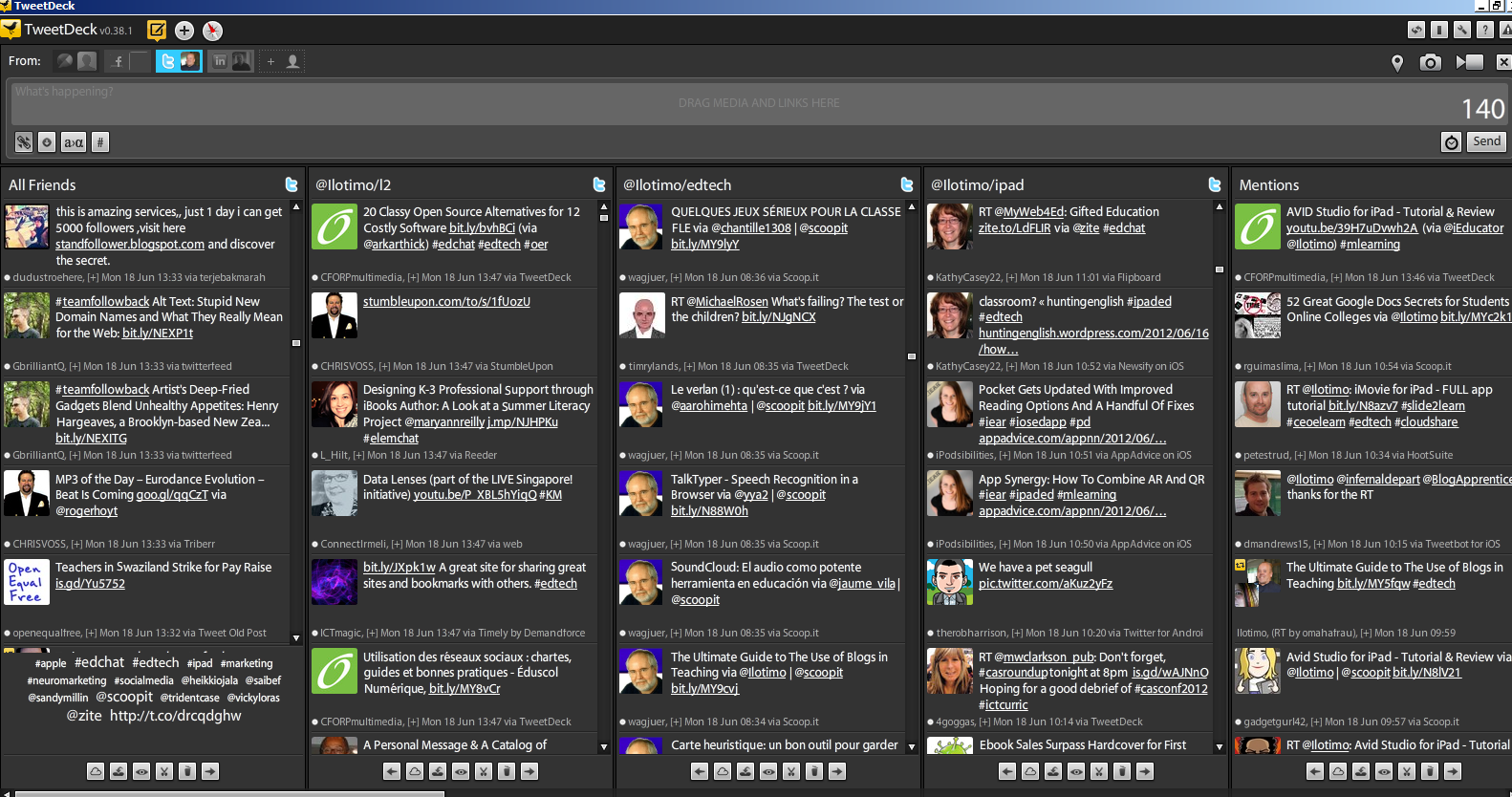
TweetDeck & 100s of Twitter tools for Teachers and  All Features of Tweetdeck part 2 so this one must be the last part of TweetDeck trilogy. Here is a short tutorial explaining why I like to use TweetDeck. 


Thursday, June 7, 2012

Experimental Physics and iPads

In Voionmaa high school, Jyväskylä, Finland,  physics class groups had task to find out with pen laser the wavelength of light. Group made a paper report and whole measuring was documented with iPad. Teacher has easier job to evaluate group later on from iPad videos. 


At this first time they didnt  edit videos with iMovie, it was just document of group work. Teacher Sirpa Suontausta said, that watching those videos was really fun and she could easily evaluate group work. I followed at corridor group work  and it was class of physics, fun and action. 


iPad development is part of six high school project using iPads in high school sport training, classrooms  and team work. Project is funded by  Finnish National Board of Education,  learning environment development programs.

If you are interested about iPads in education, follow hashtag #ifinnpad

see you, @ilotimo


Example of Experimental Physics (in Finnish, girls speak about measuring distance of numbers,  wavelength of light but sadly im not physics teacher:), so no translation, but you can learn our easy and beautiful language) 


Tuesday, June 5, 2012

QR codes, iPads and sports in high school


In Voionmaa high school, Finland, Jyväskylä,  was tested use of QR codes and iPads help of better gym training. Our sport teacher and ice hockey trainer Mika Lievonen made five weight training videos  which was linked with QR codes. We added codes in each gym equipment so our sport high school students can watch  example of good performance before training.  


Voionmaa sport high school student Orash Schmidt read codes with iPad.


Next year we have plans to use QR codes in every sport, gaming and geography. These tests related on six high school project using iPads in high school sport training, classrooms  and team work. Project is funded by  Finnish National Board of Education,  learning environment development programs.

If you are interested about iPads in education, follow hashtag #ifinnpad

 @ilotimo
One example video by Mika Lievonen (In Finnish, but body language is enough:))  


Monday, June 4, 2012

iPads and Blogger in French language project

This spring in Voionmaa high school, Jyväskylä, Finland our students used iPads ja Blogger blog in French language learning project. Group started blog with Spanish French learning study group. With iPad  Blogger apps they made blog posts and shoot videos. Good to learn languages in real projects. Thanks for our students and have great vacation!

Blog:http://parlersanssenvoler.blogspot.com/

Video greetings!. 


Tuesday, February 28, 2012

iPhone apps and resources

Lots of iPhone apps in Scoop.it! - iPhone apps and resources


Friday, February 24, 2012

Using iPads in Voionmaa High School


Using iPads in Voionmaa high school based on system, where iPads are in Leba iPad  case. We have 30 ipads in our school and whole 6 school network about 150. We share our experiences daily in Facebook and in blog. With Leba case its easy and quick to synchronize all 30 at the same time. 

We also want to give our teachers as much time to use iPads as possible. Two cases are in my office and teachers can take iPad home after school, weekends and holidays like today, when winter holiday starts. In school morning iPads are available to use in classroom.

Our school main focus in this project are iPads using in sports and by athletes. In classroom use its up to teacher how iPads are used, but our school make short time use on hour to one week, some other schools give iPads for 2 months. We can make same  a comparative study of our experiences.

 In January and February iPads used in Comenius trips in Turkey and in CERN. Our athletes practice in Spain in May and they use iPad in those kind of sport camps. 


This video was in earlier iPad post, but once again make no harm, if someone has miss that


Monday, February 20, 2012

How to make a screencast with Screencast-O-Matic

I my last post Screencasting for Teachers i shared some screencasting tools and links and also want to force myself to do my first screencasts. Yesterday i did Twitter tutorial to my Finnish colleagues in Finnish language with Screencast-o-Matic.
It was simple and quick tool, perfect for me. I use only one take, give some live feeling to presentation. 

How to make a screencast with Screencast-O-Matic

Saturday, February 11, 2012

Scoop.it! for Teachers

Scoop.it! has been around for a while, but just recently i started my own Scoop.it! and i must say, it has been a good way to collect the best tweets on one topic and share them.Teacher could also collect good links example geography or history class for students or you can create Scoop.it! for whole class.
You can also follow easily other Scoop.its.  


My Scoops:
Education Technology - theory & practice 
iPads in High School
and one for my Finnish colleagues:
Opeskuuppi

Tutorial by Russel Stannard: 

To get started, check this great video tutorial: 
Scoop.it! tutorial: teachertrainingvideos by Russel Stannard 
That is all you need! 

Sunday, February 5, 2012

Animoto - Walk in White Silence

My first Animoto for Teachers post gave some basic information how to use Animoto. Since that i have been using Animoto many times and it is great tool to make emotional videos and thats why it is great for classroom use with students. They can share example their meaningful moments with easy and quick Animoto video. In one class you can take photos and produce a video. 


My moment in our neighbourhood forest, really cold, almost - 30 but so beautiful

Wednesday, February 1, 2012

iPads in Sport High School

Im really proud to start sharing our results from our new project: iPads in 6 Finnish High Schools. I work in Sport High School and we want that our athletes could benefit from iPads in their practice, 3 times a week during school day. Our sport teachers have been really inspired and use iPad every day in different sports. 


Check our first video, some word of experience, lot more to see after this during this spring. 


Sunday, January 8, 2012

Google+ & Hangout for Educators

One of year 2012 technology promise to my self was to activate in using  Google+. After using Twitter actively was easy to find great educators around the world in my circles. Google+ is a professional network for me just like Twitter. Google Hangout is also great feature which we use in our online meetings. 
Livebinders: Googleplus for Educators
Cybrarymans Googleplus page
Mashable Google+: The Complete Guide


How to use Google+ Tutorial (Basics) 
by (tbonepearson Travis Gordon)


Peter G McDermott:

How to Use Google+ Hangouts (A Beginners' Guide)


Monday, January 2, 2012

Vimeo for educators

In year 2012 I am going to focus on different video services and screencasting possibilities. 
First there is Vimeo. 

"Vimeo is the home for videos you create." (Vimeo.com)


What is the Basic use of Vimeo? You can upload and share your videos, connect with community, explore videos in different categories, and learn how to make videos in Vimeo Video school. 


About month ago i made my first Vimeo uploading. Making a video took about 10 minutes and sign in and uploading about 15 minutes, so its easy and quick.  It easy to embed to your blog like Youtube videos.  


Speech about Finnish education system in Teachmeet event in Holywell High School in Wales


Finnish education system by Timo Ilomäki from Timo Ilomäki on Vimeo.


Wednesday, December 21, 2011

Animoto for teachers

Christmas is coming and i had a great job to make Christmas calender for #CCglobal Schools. And we all know, that the original Santa lives in Finland, Lapland, so i need to find a Santa. Luckyly Santa was visiting in my Voionmaa upper secondary school and i had lots of pictures fro Santa and our Students.


I need a tool to a Christmas video and thanks for my Greek teacher friend George Panagiotakopoulos @Physiart, i understood, that Animoto is the one for the job. Also yesterday i had some advice from Liam Dunphy and Mr @physiart about taking Education account in Animoto. Instead of free 30 sec. video you get longer videos and password for 50 students. (Thanks for collaboration in Twitter guys!) There are also Animoto for iPhone, witch makes great new elements for mobile learning.
Just check the Animoto features and create a video with music, text, images and video. 


I dont want to present my Christmas calender yet and spoil the surprise, so im going to make from random pictures of my computer a 30 sec presentation starting now. Clock is ticking . . .5 minutes and Animoto is making the video, video embed here under total of 10 minutes. 


For Seasons by @ilotimo and Merry Christmas!


Sunday, December 4, 2011

Guest post by Brian Kotts: How I Became a Pad Teacher


I asked Teacher at Linnaeus University Mr. Brian Kotts to be a make a guest post to my blog and i am really glad he did, so thanks for your effort Brian. We have 6 High school iPad project going on, so i enjoyed this information a lot. This is great collaboration which Twitter community makes possible. 

A recent study showed that the use of iPad in schools is expected to surpass computers in five years. This may seem inevitable considering that children have become more skilled in using computers than activities like riding bikes or swimming.

Noticing that most students owned iPads, it dawned on me that we put them to more productive use. The disruptive nature of the iPad has facilitated in the flipping my classrooms, which has transformed how the students approach their learning.


Here are the apps that we’ve been actively using in the past two months:

Turned my iPad into a smartboard allowing mirroring of the notes and sketches in multiple colors. These are then separated into topics or projects later emailed to students or posted to a blog in PDF format.

2. Apple’s iWork suite
Pages for word processing, Keynote for presentation and Numbers for spreadsheet. With the integration of iCloud, it’s now easier to move docs in and out of the apps. Apple’s Open In… feature works too if one uses DropBox or SugarSync.

Has been excellent for backup as it automatically syncs files across multiple devices, and offers remote file access and sharing. It has also doubled as a PDF- and document-reader,

Great for reseach and archiving. “Read Later” list, whilst has allowed for better scanning of titles, easy management with Archive and Delete buttons, and faster refresh times.

5. TED
TED talk has 900+ videos from some of the world’s most fascinating people: education radicals, tech geniuses, medical mavericks, business gurus and music legends. Students have been able to bookmark or download their favorite TEDTalk for playback later.

After each student registered for an account, we created individual and collective notebooks for sharing and collaboration especially for research and group assignments.

This has mostly been used for podcasts, lectures with guest lecturers, video conferencing with other classrooms and virtual tours with experts in various fields.

The Perfect iPad Twitter App.

GoodReader has hundreds of functionalities and support for different file types. Not only has it been able to re-format files for easy reading on the iPad, but also access to documents stored online on services like MobileMe, Google Docs, Dropbox and more and downloading of files straight from URLs.

Using this tutorial made creating podcasts quite seamless. The coolest function is to uploading the podcasts to iTunes for students to subscribe.

Wikipedia is the number one site that students go to when they begin researching a topic. It’s features are far better than the native wikipedia app. These include smart autocompletion, much like Google search, keeping track of the last one hundred pages, uses geolocation to detect where you are and suggests relevant articles based on that location.
Some one million words and definitions based upon the Random House Unabridged Dictionary are included, while the Roget’s 21st Century Thesaurus boasts more than 90,000 synonyms.