TweetDeck & 100s of Twitter tools for Teachers and All Features of Tweetdeck part 2 so this one must be the last part of TweetDeck trilogy. Here is a short tutorial explaining why I like to use TweetDeck.
Information about the history of technology in the world, and advances in current technology. Provide a list and description of current technologies, ranging from software, hardware, networking, and others.
Showing posts with label twitter. Show all posts
Thursday, July 5, 2012
Sunday, August 7, 2011
TweetDeck & 100s of Twitter tools for Teachers
I have posted about Twitter a few times before. Twitter in Classroom part 1. ; Twitter in Classroom 2 ; Twitter in Classroom part 3; Updates: Facebook and Twitter in Classroom and Georgia Department of Defense: Tactical Guides of Social Media.
This post share some examples of other available Twitter tools which gives extra boost on your tweeting.
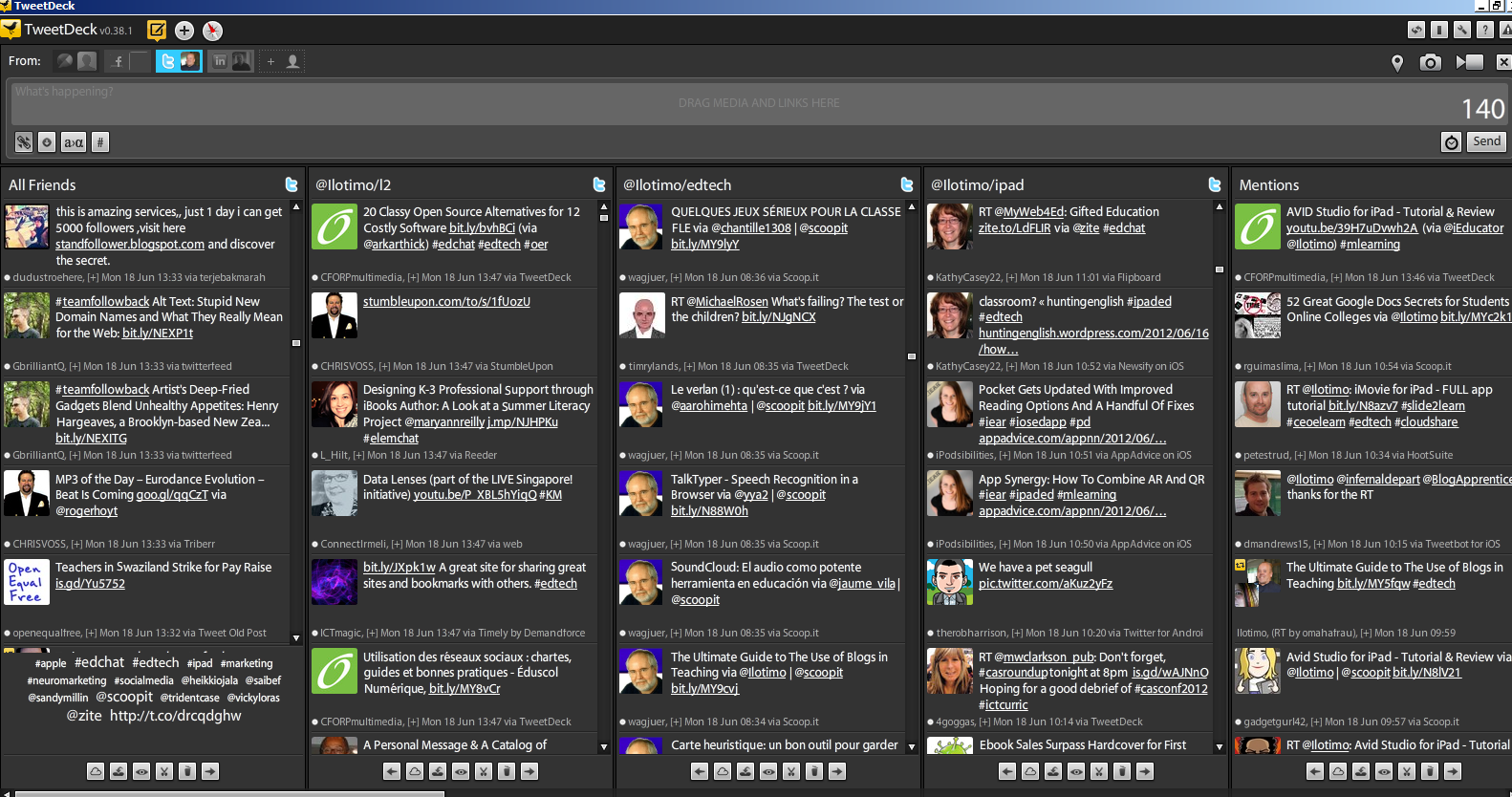
My top tool is TweetDeck. Best feature in TweetDeck is that i can see multible columns in one view, very quick look and i know whats happening, like example today i have 15 columns open. First all friends, my top list, my iPad list, mentions, #RSCON3, #finnedchat, favorites, direct messages, new followers, #edtech, #mlearning, #ipadchat, #ipaded, Facebook, Linkedin.
I also open new columns for daily needs, like follow my new blog post retweeting (for thanking them), follow interesting hashtags, sometimes i follow one person, who has some spesific information, like Scott Newcomb @snewco from mlearning or @web20classroom Steven W. Anderson from everything related education technogy and many others.
Thats enough from my experiences, check out these tutorials, slides and links from TweetDeck and other hundreds of Twitter tools.
Josh Stumpenhorst @Stumpteacher tutorial: Twitter 102 (using TweetDeck)
Twitter 102 by Amanda L. Sage
Twitter tools for teachers
Top 100 Tools for the Twittering Teacher
150+ Ultimate Round-Up of Helpful Twitter Articles
99 Essential Twitter tools
Cybrarymans Twitter page
Tips, apps and resources for Twitter
Top 100 Twitter Tools
Top 50 tracking and analytics tools
Top 25 url shortener tools
10 Awesome Twitter Analytics and Visualization Tools
8 free tools visualize information on Twitter
18 best tools to analyze your Twitter hotness
Top 20 Sites to Improve Your Twitter Experience
18 Twitter Tools for Scheduling Future Tweets
27 Twitter Tools To Help You Find And Manage Followers
This post share some examples of other available Twitter tools which gives extra boost on your tweeting.
My top tool is TweetDeck. Best feature in TweetDeck is that i can see multible columns in one view, very quick look and i know whats happening, like example today i have 15 columns open. First all friends, my top list, my iPad list, mentions, #RSCON3, #finnedchat, favorites, direct messages, new followers, #edtech, #mlearning, #ipadchat, #ipaded, Facebook, Linkedin.
I also open new columns for daily needs, like follow my new blog post retweeting (for thanking them), follow interesting hashtags, sometimes i follow one person, who has some spesific information, like Scott Newcomb @snewco from mlearning or @web20classroom Steven W. Anderson from everything related education technogy and many others.
Thats enough from my experiences, check out these tutorials, slides and links from TweetDeck and other hundreds of Twitter tools.
Josh Stumpenhorst @Stumpteacher tutorial: Twitter 102 (using TweetDeck)
Twitter: Top Twitter tools exposed & explaned by lightning speed by Zebolsen
Twitter 102 by Amanda L. Sage
Twitter tools for teachers
Top 100 Tools for the Twittering Teacher
150+ Ultimate Round-Up of Helpful Twitter Articles
99 Essential Twitter tools
Cybrarymans Twitter page
Tips, apps and resources for Twitter
Top 100 Twitter Tools
Top 50 tracking and analytics tools
Top 25 url shortener tools
10 Awesome Twitter Analytics and Visualization Tools
8 free tools visualize information on Twitter
18 best tools to analyze your Twitter hotness
Top 20 Sites to Improve Your Twitter Experience
18 Twitter Tools for Scheduling Future Tweets
27 Twitter Tools To Help You Find And Manage Followers
Tuesday, June 28, 2011
Georgia Department of Defense: Tactical Guides of Social Media
Found some great presentations from Slideshare about topics I have post before.
Source is the SlideShare account of the Georgia National Guard. Tactical guides of Twitter, blogging, Facebook, social media, Flickr and Youtube.
Tuesday, June 14, 2011
Updates: Facebook and Twitter in Classroom
In my first posts I present some ideas Twitter in Classroom part 1 and part 2 and also Facebook in Classroom. Since then many new updates has been published. But first you have good possibility to enjoy and relax by listening lecture, slidecast on Facebook Strategies for the Classroom by Kevin Lim. Lasting hour and 56 minutes! If you are busy as they say in these days, there is Youtube video Twitter in 60 seconds.
Twitter in 60 seconds for teachers
Updates:
Twitter Finds a Place in the Classroom CNN video
Twitter for Teachers
Using Facebook in Education
How teachers can use Twitter to maximise their professional learning
Twitter in Classroom
Twitter and facebook used as vrtual classroom with help of Hootcourse
How teachers Facebook and Tweets for Students
How Twitter in the Classroom is boosting Student Engagement
Facebook and Youtube in Classroom
Teach with Twitter
If You were on Twitter
Twitter in 60 seconds for teachers
Updates:
Twitter Finds a Place in the Classroom CNN video
Twitter for Teachers
Using Facebook in Education
How teachers can use Twitter to maximise their professional learning
Twitter in Classroom
Twitter and facebook used as vrtual classroom with help of Hootcourse
How teachers Facebook and Tweets for Students
How Twitter in the Classroom is boosting Student Engagement
Facebook and Youtube in Classroom
Teach with Twitter
If You were on Twitter
Thursday, May 26, 2011
Twitter in Classroom (part 3)
In our third part we go deeper with tutorials in applying Twitter in Classroom. But first, if there is a reader who doesnt have Twitter account yet, this tutorial is for you. Get a cup of coffee, look all the tutorials and links, and you dont want to start your vacation:)
"Dr. Rankin, professor of History at UT Dallas, wanted to know how to reach more students and involve more people in class discussions both in and out of the classroom." From Youtube video-trailer. So their started use Twitter.
Using Twitter in Elementary School
"Dr. Rankin, professor of History at UT Dallas, wanted to know how to reach more students and involve more people in class discussions both in and out of the classroom." From Youtube video-trailer. So their started use Twitter.
Twitter is also handy on Kinderkarden in Meridian School in Seattle.
Using Twitter in Elementary School
This is great video with good examples
You find more videos on Youtube by search Twitter in Classroom.
This is not enough to make you perfect Twitter-teacher. Finally there some links you should check. Take your 23 steps becoming Twitter -teacher. After these steps you are ready to 100 new ways to use Twitter in Classroom. And then you become hungry so check 101 Ways to use Twitter in Campus. Finally for desert there are two WOW-experiences from Twitter use in Role Playing. Temporal Tuesday - when everyone gets your own Timemachine and TWhistory -Those who forget history are doomed to re-tweet it
These fantastic examples end our journey on Twitter in Classroom. But all us teachers know, that in August we have many new great ideas in our classrooms.
In my blog I continue presentations from Education Technology. We leave Twitter behind for a while, and search Facebook in school and social bookmarking tool Diido, my dear library use in classroom. Then we come back on Twitter and I prensent the ultimate Twitter tools, what every Twitter-teachers needs.
I hope you join and start collect good new ideas and examples from Twitter in Classroom at hashtag #twinclass.
Tweet You! @ilotimo
Wednesday, May 25, 2011
Twitter in Classroom 2
Twitter in classroom ideas:
Make Twitter-account to your school
Researching a topic using hashtag
Creat a learning network PLN -follow and be followed by people with similar interest
Creat your course learning network – follow together same people
Asking questions from teacher and students
Seeking help or advise on a project from Twitter community
Following leading thinkers
Sharing what you are learning in a course
Taking notes in class
Read an article, webpage, book and summarize on tweets.
Twiit links to your classmates
Follow a famous person and document their progress. President, elections, popstars . . .
Role playing. Choose historic person and create a twitter account for them – choose an image which represents the historical figure. There are countless ways to take different roles in different subjects, religion, history, philosophy . . .
Learn more of different cultures, twiiting with school abroad.
Have students
Sharing blog posts
Tell a story, 140 characters and one student at a time. Twitter stories.
Be a journalist. Describe what you see, be a reporter in and out school: events, news.
Follow mentors or famous people
Know your classmates better. One student at time could be a Twitter-chat host
Brainstorming project ideas
Vote
Ask student their opinions in different subjects.
Share interesting websites. Teachers and students can post interesting websites
33 Ways use Twitter in Classroom
Lets create more together!
Make Twitter-account to your school
Researching a topic using hashtag
Creat a learning network PLN -follow and be followed by people with similar interest
Creat your course learning network – follow together same people
Asking questions from teacher and students
Seeking help or advise on a project from Twitter community
Following leading thinkers
Sharing what you are learning in a course
Taking notes in class
Read an article, webpage, book and summarize on tweets.
Twiit links to your classmates
Follow a famous person and document their progress. President, elections, popstars . . .
Role playing. Choose historic person and create a twitter account for them – choose an image which represents the historical figure. There are countless ways to take different roles in different subjects, religion, history, philosophy . . .
Learn more of different cultures, twiiting with school abroad.
Have students
Sharing blog posts
Tell a story, 140 characters and one student at a time. Twitter stories.
Be a journalist. Describe what you see, be a reporter in and out school: events, news.
Follow mentors or famous people
Know your classmates better. One student at time could be a Twitter-chat host
Brainstorming project ideas
Vote
Ask student their opinions in different subjects.
Share interesting websites. Teachers and students can post interesting websites
33 Ways use Twitter in Classroom
Lets create more together!
Twitter in classroom. Part 1.
Twitter has been dramatic change for me as an educator. I was already active user of Facebook in my leisure and also in work, but it was Twitter, which really make a change. Suddenly educators around the world were part of my PLN. I had many questions about Finnish education and got many good tips, links and information in my use. Im interestid in social media in education, so Twitter is at moment best chanel update your information. Like I said on my first post, I develop my personal learning network following from TweetDeck simultaneoysly my friends, my lists, favorites, mentions, messages, new followers, different hashtags like #edchat #edtech #mlearning.
Twitter is a place for teachers to collaborate, share their experience every day schoolwork and materials, develop pedagogical methods, learn more about languages and cultures, make new connections and partnerschools.
I share my presentation on Twitter in classroom on three parts. At the end of this short introductions there is great tutorial video from Twitter in classroom by @paulandersson.
Subscribe to:
Posts (Atom)